One of the most powerful features Xero has is the ability for small business owners to collaborate with their accountants. When you are ready to invite your accountant, you can give them access to your Xero subscription with the following instructions:
1. Click on your organisations name (top left-hand corner of the screen).
2. Click on Settings.
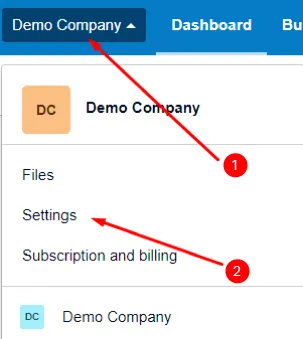
Access your organisation settings in the top left-hand corner of the Xero screen.
3. Under the General heading, click on Users.
4. Then click on the Invite a user.
5. Enter your accountant’s details (First name, Last name and Email).
6. Under the Give them access to heading, you should tick the following:
- Payroll admin
- Business and accounting
Then click on Adviser and ensure that you tick all empty boxes (as per the below):
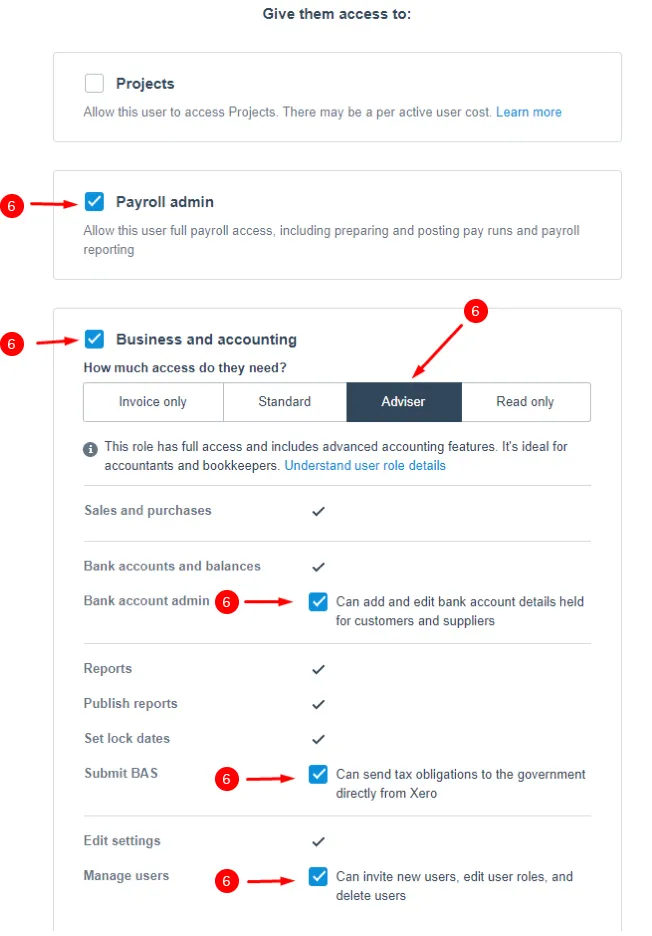
Choose the above settings to give your accountant access to your Xero account.
7. Lastly, click on Send invite.
Your accountant will then receive an invite to your Xero subscription via email. Once accepted, they will be able to work with you live in Xero!